
Troubleshooting Common Issues
Here are some common issues we've seen and how to solve them.
Can't Login
Check Credentials: Ensure that the email and password entered are correct. Remember that passwords are case sensitive.
Correct Email: Verify that the email address being used to log in is the one registered with your account.
Password Reset: If you've forgotten your password, click on the 'Forgot Password?' link to initiate a password reset.
Browser Issues: Try clearing your browser's cache and cookies or try logging in from a different browser or incognito mode.
No Email Invite/No Password Reset Email
Spam/Junk Filters: Check your spam or junk mail folder for the email.
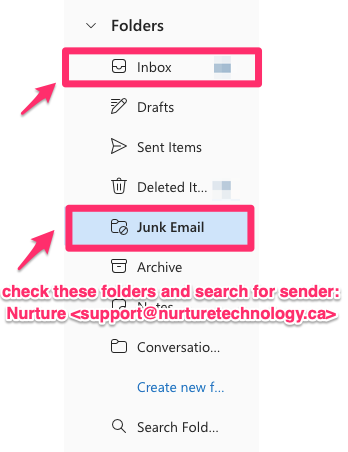
Email Accuracy: Confirm that the email address in your profile is spelled correctly.
Alternate Email: If issues persist, contact your direct supervisor to update your email address in the system and attempt another password reset.
System Delays: Be aware that email deliveries can be delayed. If you don't receive the email immediately, wait a few minutes.
Can't Submit CIR (Critical Incident Report)
Required Fields: Confirm that all mandatory fields are completed. These fields are usually marked with an asterisk (*).
Error Messages: Pay attention to any messages or banners indicating missing or incorrectly filled details.
Support Ticket: If you continue to experience issues, submit a support ticket through the help section or contact your system administrator.
Nurture Link Not Working
Correct URL: Ensure you are visiting the correct URL: https://app.nurturetechnology.ca/
Expired Links: Do not use the link provided in the initial email invitation to access the platform, as it is meant solely for setting up a password and expires after use.
Network Connection: Check your internet connection to ensure you have active and stable Wi-Fi or wired network access.
Firewall or Security Settings: Verify that your firewall or network security settings do not block access to the Nurture site.
General Troubleshooting
Browser Compatibility: Ensure that you are using a supported browser. The platform works best on the latest versions of Chrome, Firefox, Safari, or Edge.
Device Issues: If problems persist on one device, try accessing the site from a different device to determine if the issue is device-specific.
Contact Support: If none of the above solutions work, contact the Nurture support team for further assistance. Provide them with details of the issue, error messages received, and steps already taken.
How to reset your password
Method 1: Reset via the login screen
Navigate to https://app.nurturetechnology.ca/
If signed in, sign out of your account.
On the log in screen, select “Forgot password?”
Enter the email associated with your account and click on “Send email”
Method 2: Reset from Your Profile
If you already know your current password and simply wish to change it, you can go to "Your profile" and set a new password in the "Change Password" tab.